


Clean Now: Storage Cleaner
4.120.00 Reviews
App Specs
- Version
- 1.0.4
- Updated On
- License
- Free
- Downloads
- 100,000+
- Developer
- iKame - Begamob Application AI
- Categories
- Tools
- Platform
- Android
Screenshots

 Analysis by AppCompare
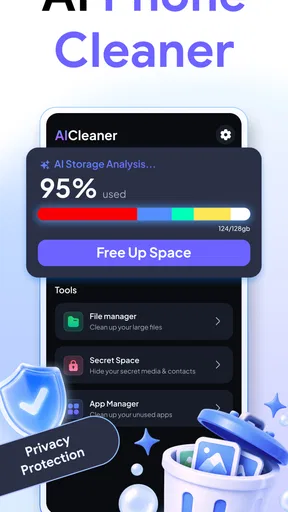
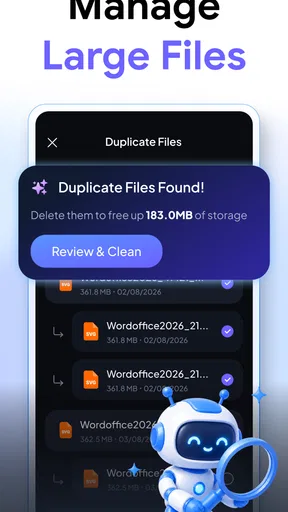
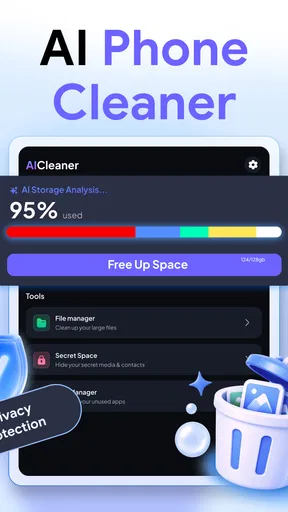
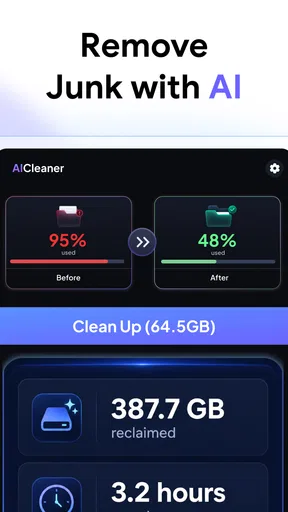
Phone storage rarely disappears in one dramatic moment. In my experience, it leaks away through near-identical photos, forgotten videos, old downloads, unused apps, and contacts that have quietly accumulated over time. The frustrating part is not only the number of files; it is the effort needed to decide what can safely go. Clean Now: Storage Cleaner approaches that recurring problem as a practical phone-cleaning tool, using AI-assisted organization to help identify duplicated photos, videos, files, apps, and contacts.
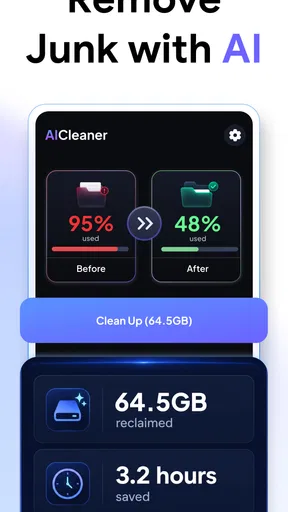
I tested it with a simple question in mind: does it actually save time compared with opening each folder and checking everything manually? My answer is cautiously positive. It is most useful when the phone has become cluttered enough that ordinary browsing feels overwhelming, but it still requires attention before anything important is removed. The app is free to install, aimed at everyone, and developed by iKame - Begamob Application AI. Its current version is 1.0.4, and the overall experience is focused rather than overloaded with unrelated tools.
Why this kind of cleaner is useful
The main appeal is not the promise of a magically faster phone. The real benefit is reducing the mental work involved in storage maintenance. When I look through a camera roll manually, I have to remember which images belong together, compare similar shots, switch between folders, and repeatedly decide whether a file is worth keeping. That process becomes especially tiring after a trip, a family event, or a long period of messaging.
Clean Now: Storage Cleaner is built around those repetitive decisions. Instead of treating every file as an isolated item, it looks for categories where clutter commonly appears. That makes the first review more structured. I can think in terms of duplicate images, large video groups, redundant files, unused applications, or contact cleanup rather than wandering through the entire device.
That distinction matters. A cleaner is only valuable if it makes the decision process easier, not merely if it displays a large amount of storage. The strongest part of this app is therefore its ability to turn a vague “my phone is full” problem into several smaller tasks. The time saved comes from sorting first, deleting second.
Its store presence also suggests that it has found an audience: it has passed one hundred thousand installs and holds a 4.1 average from around one thousand two hundred ratings. I would not treat those figures as proof that every scan is perfect, but they do indicate that this is not an obscure experiment with no practical use. The app belongs in the tools category, and that description fits its straightforward purpose.
The first scan should be treated as an audit
My advice is to approach the first session as an audit rather than a cleanup race. Let the app organize the problem, then inspect each group with a slightly different level of caution. Duplicate screenshots are usually easier to judge than personal videos. Repeated downloads may be replaceable, while an old document might still matter months later.
Worth Reading Before You Choose

EA SPORTS FC Mobile 26 Is a Bigger Football Game, but It Takes Time

Flipboard Shows What News Apps Must Do Beyond the Feed

Switching to Android Auto Means Rethinking Your Driving Routine

Google Calendar Makes a Crowded Week Easier to Manage

Ludo King Makes the Most of the Minutes Between Plans

Baby Panda World Brings Quick Play to Modern Phones, but Its Game Library Feels Busy
This is where many storage cleaners can create unnecessary anxiety: they make deletion appear like the final, obvious step. I prefer to see the scan as a recommendation layer. Clean Now can help surface likely clutter, but I would still open representative items before confirming a large batch. A visually similar photo may have a different crop, better focus, or sentimental value that an automated match cannot understand.
The same caution applies to contacts. Duplicate entries can be genuinely annoying, especially when names differ slightly or one record contains a useful number that another lacks. Contact cleanup is not the place for blind bulk actions. I would compare the details, preserve the more complete record, and only then remove the redundant entry.
What I would prepare before using it
A little preparation makes the app more useful. First, I would decide whether the immediate goal is freeing space or making the phone easier to browse. Those goals overlap, but they are not identical. Removing several small duplicate images may improve organization without changing available storage much, while deleting a few long videos can create more room quickly.
Second, I would begin with categories where mistakes are easier to reverse mentally: obvious duplicates, temporary-looking downloads, and applications I recognize but no longer use. I would leave personal videos, work files, and contacts until I had more time. This order reduces the chance of rushing because the phone is nearly full.
Third, I would use the app after a natural clutter event instead of waiting indefinitely. After returning from a holiday, for example, I might have several versions of the same scene, short clips I never watch, and screenshots used only for navigation. Cleaning then is more manageable because I still remember what the files are for.
How it fits into everyday phone use
I find a cleaner most useful when it helps me decide where to begin, not when it urges me to delete quickly. For a phone that has filled up gradually, I’d first separate obvious duplicates from files that need a closer look, then use that distinction to guide a calmer cleanup. That everyday approach also makes it easier to judge which parts of the app are worth returning to.
After a trip or family gathering
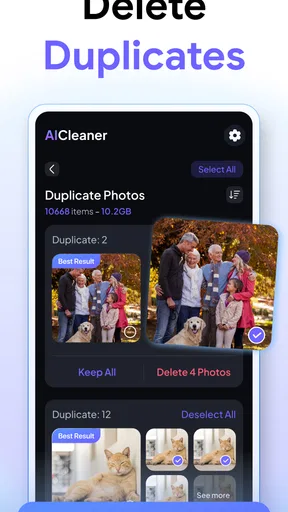
This is the clearest scenario for me. I often take multiple shots because someone blinked, the lighting changed, or I wanted a backup angle. A few days later, the camera roll contains clusters of nearly identical images. Manually reviewing them one by one is possible, but it is dull enough that I tend to postpone it.
With Clean Now, the useful workflow is to review the proposed duplicate groups while the event is still fresh. I can keep the sharpest image, retain a meaningful variation, and remove the obvious repeats. The app does not eliminate the judgment call, but it reduces the time spent locating candidates. That is a practical improvement over scrolling through the entire gallery.
I would still avoid selecting every suggested item in one tap without checking the group. A burst of photos can look repetitive to software while still containing the one frame where a child is smiling or everyone is looking at the camera. The best result comes from using the app as a shortlist generator, not as an unquestioned replacement for personal memory.
When videos are the real storage problem
Photos attract attention because there are so many of them, but videos often deserve priority when space is tight. A handful of long recordings can occupy more room than a much larger collection of ordinary images. Clean Now’s ability to bring video clutter into the same cleaning workflow is therefore more useful than a photo-only approach.
My preferred method would be to review videos by context. I would keep original recordings, memorable moments, and anything that has not been backed up elsewhere. Short accidental clips, repeated exports, and videos created for temporary sharing are better candidates. This is also where I would slow down, because deleting a video is more consequential than removing a duplicate screenshot.
A helpful habit is to ask whether I would realistically find or recreate the recording later. If the answer is no, I keep it. If it is a duplicate or a disposable copy, the app makes it easier to locate. That decision rule is more reliable than judging only by file size.
Downloads, files, and forgotten applications
File clutter is usually less visible than gallery clutter. Documents downloaded for a single appointment, repeated attachments, exported images, and old installers can remain in storage long after their purpose has ended. The app’s file-focused cleanup gives these items a place in the review instead of leaving them buried in a file manager.
I would be especially careful with filenames that look generic. A document called “final” or “scan” may be more important than its name suggests. Before deleting, I would open anything connected to work, school, travel, health, finance, or identity. The app can reduce searching, but it cannot know the future value of a document from its filename alone.
The app also includes app cleanup, which is helpful for spotting software I installed for one occasion and never opened again. This is a good way to recover attention as well as storage: a crowded app drawer makes it harder to find the tools I actually use. However, I would not remove an application solely because it has not been opened recently. Seasonal apps, travel tools, authentication utilities, and emergency resources may be quiet but still worthwhile.
Contact maintenance without losing useful information
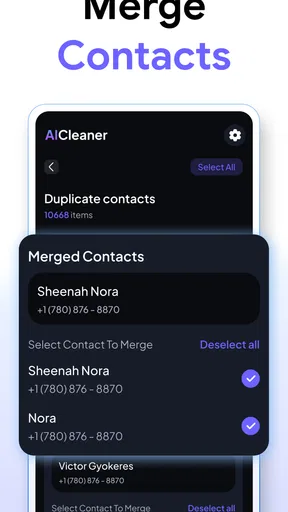
Contact cleanup is a less obvious part of a storage utility, but it can solve a different kind of clutter. Duplicate records often appear after changing phones, importing accounts, or saving the same person through several messaging apps. Having multiple entries can make calling and messaging slower because I have to guess which one is current.
The trade-off is that contacts are more sensitive than ordinary duplicate files. Two entries with the same name may belong to different people, and two entries with different names may actually be the same person. I would use the app to identify possible matches, then compare phone numbers, email addresses, and notes before merging or removing anything. That extra minute is worthwhile.
What makes the workflow less tiring
The app’s biggest friction reduction is organizational. It puts several common forms of clutter into one maintenance routine, so I do not have to remember separate searches for photos, videos, files, applications, and contacts. That is particularly useful for someone who does not enjoy managing storage and tends to postpone it until the phone becomes inconvenient.
It also gives me a more sensible starting point than the usual storage screen. A system settings page may show which categories consume space, but it often leaves the detailed decision to me. A file manager gives control, but not necessarily a clear shortlist of likely duplicates. Clean Now sits between those approaches: more guided than manual browsing, but still dependent on user review.
That middle ground is important. If I wanted complete control over every file path and metadata detail, I would choose the built-in file manager. If I wanted the fastest possible deletion with no inspection, I would be taking risks. This app is better for people who want assistance finding candidates while keeping the final decision in their own hands.
Where I noticed the most practical value
The non-obvious advantage is consistency. A large cleanup session can feel like a chore, but a category-based review is easier to repeat. I can handle photos one day, files another day, and contacts when I have enough concentration. That makes maintenance less dependent on having a free afternoon.
Another useful insight is that cleanup order changes the experience. Starting with obvious duplicates builds confidence and quickly reduces visual noise. Starting with contacts or important documents makes the first session feel risky. I would therefore use the app in descending order of certainty, not simply in the order the categories appear.
A third insight is that freeing space and preventing future clutter require different habits. Clean Now helps with the backlog, but it cannot decide whether I should keep taking five nearly identical photos or downloading multiple copies of the same file. After using it, I would try to delete temporary screenshots and duplicate exports closer to the moment they stop being useful. The app works best as a reset button followed by lighter maintenance.
Cost, compatibility, and who should use it
Clean Now is free to download, which makes it easy to try before deciding whether it deserves a regular place on the phone. Optional in-app purchases range from forty-nine cents to sixty-nine dollars and ninety-nine cents per item, so I would pay attention to what is included before confirming anything. The free entry point is convenient, but the broad purchase range means users should not assume every part of the experience has the same cost.
It is rated for everyone and supports devices running Android nine or later. That gives it a fairly accessible starting point for people using older compatible phones, although the practical experience can still vary depending on how much content the device contains and how its files are organized.
The app is a strong fit for someone with a crowded personal phone, a large camera roll, repeated downloads, or a contact list that has become difficult to trust. It is also useful for people who dislike manual file management but do not want to hand over every deletion decision to an automatic process.
I would skip it if I already keep my storage carefully organized, rarely save media, and am comfortable using built-in system tools. I would also choose a more manual approach if my phone contains sensitive professional records and I need detailed control over every item before it is even grouped. In that situation, convenience is less important than transparency.
My final assessment
Clean Now: Storage Cleaner succeeds when judged by the problem it is meant to solve: the repeated, low-value effort of finding clutter. It does not make every cleanup decision for me, and that is ultimately a strength. The app is most trustworthy when I use its categories and suggestions to narrow the search, then apply my own judgment to anything personal or important.
I especially like the combination of duplicate media discovery, file review, app cleanup, and contact organization. Those areas are often handled separately, so bringing them into one routine can make a neglected phone feel manageable again. The experience is less about chasing a dramatic technical boost and more about recovering usable space and reducing daily annoyance.
There is still friction. I need to inspect suggestions, be cautious with contacts and documents, and understand the purchase options before spending money. People looking for a completely automatic cleaner may find that caution inconvenient. For me, though, that limitation is preferable to an app that treats every match as disposable.
My recommendation is simple: try it when your phone feels cluttered, begin with obvious duplicate photos and temporary files, and leave meaningful videos and contacts for a slower review. If that workflow sounds reasonable, this tools app from iKame - Begamob Application AI is a useful way to reclaim control without turning storage management into a full-time task. Use it as a careful assistant, not an automatic delete button.
Pros
- Quickly identifies large
- duplicate
- and unnecessary files
- Simple interface makes storage cleanup easy for beginners
- Helps free space without requiring advanced technical knowledge
- Useful tools for reviewing photos
- videos
- and downloaded files
- Can improve device organization by grouping cluttered content
Cons
- Some features may be restricted to a paid subscription
- Scanning large media libraries can take noticeable time
- Automatic cleanup suggestions should be reviewed before deletion
- Results may overlap with built-in Android or iOS storage tools
- Cleanup effectiveness depends on the device and available file access
FAQs for Clean Now: Storage Cleaner
What is Clean Now: Storage Cleaner used for?
Clean Now: Storage Cleaner is designed to help you review and remove unnecessary files from an Android or iOS device, depending on the version available in your region. Its tools may identify items such as temporary files, duplicate photos, large videos, screenshots, and unused content. It is most useful as a manual cleanup assistant rather than a guaranteed one-tap performance booster.
Can Clean Now: Storage Cleaner safely delete important photos or files?
The app may suggest files that appear unnecessary, but users should always review the selection before confirming deletion. Similar photos, old downloads, and large media files can sometimes include content you still want to keep. Check previews, file names, and folders carefully, and create a backup of important photos or documents before using any bulk-cleaning feature.
Does Clean Now: Storage Cleaner improve phone speed or battery life?
Removing unwanted files can free storage space and may help a device behave more smoothly when it is nearly full. However, Clean Now: Storage Cleaner cannot replace system maintenance, remove every cause of slow performance, or guarantee longer battery life. Results depend on your device, available storage, background apps, and the amount of unnecessary content found.
Is Clean Now: Storage Cleaner free to download and use?
The application may be available as a free download, but some tools, extended scans, or advanced cleanup options can require in-app purchases or a subscription. Before starting a trial, check the pricing page, renewal terms, and cancellation instructions shown in your app store. Availability and included features may also differ between Android and iOS versions.
What permissions does Clean Now: Storage Cleaner require?
A storage-cleaning application generally needs permission to access photos, videos, files, or other media so it can scan and organize items for review. Only grant permissions that match the app’s stated purpose, and read the privacy information before continuing. If a permission request seems excessive, deny it and confirm which features remain available without that access.


